NCPMobile: Shopping Rewards
- 4.5
- Rating
- 1.00M
- Installs
- Free
- Price

 Analysis by App-foxy
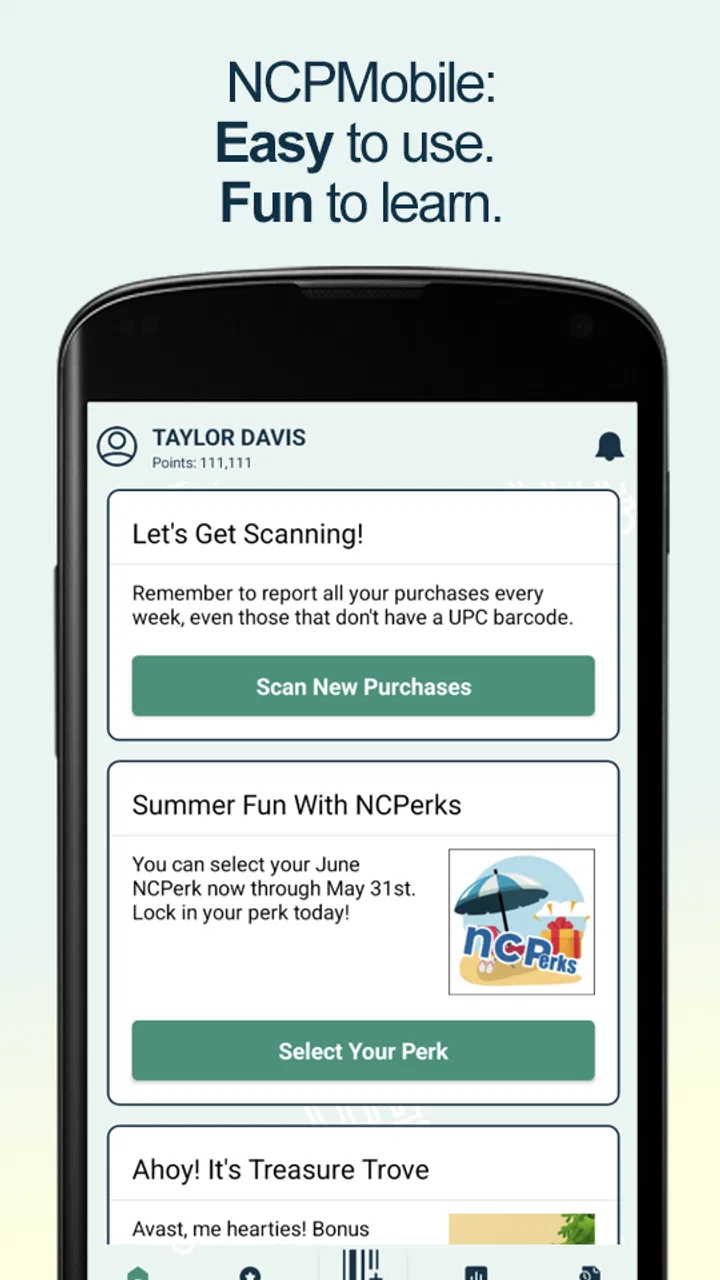
I approached NCPMobile as a shopping companion rather than a conventional rewards marketplace. Its central task is straightforward: scan purchases and transmit them to the National Consumer Panel. That focus makes it interesting for people who are comfortable contributing shopping information through a dedicated panel app, but it also means the experience depends heavily on how clearly each step is presented and how manageable the scanning routine feels in everyday life.
The app is free, available for Everyone, and belongs to the Shopping category. It has reached over a million installs, with an average rating of 4.5 from around 59 thousand ratings. Those figures suggest that the basic idea works for a sizable audience, although popularity alone does not tell me whether it will suit someone who needs especially clear controls, flexible timing, or a more rewarding experience than simple purchase reporting.
How NCPMobile feels to use in real shopping situations
I find the experience is shaped less by shopping features than by one repeated action: scanning purchases and sending the information to the National Consumer Panel. That makes the app easiest to judge with a real item and a little time, rather than by browsing its screens in isolation. I’d start with a single purchase, notice where I need to pause, and then consider whether that routine fits the way I shop.
You May Also Like

 Blood Strike: 2.5 Anniversary
Blood Strike’s Loadouts Turn Every Drop Into a Tactical Gamble
A close look at Blood Strike’s custom loadouts: how fast access to signature weapons reshapes its battle royale rhythm, rewards preparation, and narrows the gap between fights.

 Pandora - Music & Podcasts
Pandora’s Music Is Easy to Start, but Harder to Recover
Pandora’s strength is its low-effort path from a seed to a station. Its weak spot is how much confidence it asks you to place in connection, setup, and quiet recovery.

 8 Ball Pool
 Is Built on Rivalries, Rematches, and Routine
A close look at the rivalries, rematches, shared routines, and unanswered safety questions that turn a quick pool match into a persistent mobile community.

 Samsung Music
’s Quiet Strength Is Playing What You Already Own
Its reach comes less from spectacle than from dependable access to a personal library. That simplicity is both the app’s strongest retention engine and its ceiling.

 AccuWeather: Weather Radar
AccuWeather Review: A Quick, Clear Forecast for Everyday Decisions
For everyday plans, the best forecast is the one you can understand quickly. AccuWeather makes rain timing, radar, and local conditions easy to act on, with a few trade-offs.

 Hill Climb Racing
Why Hill Climb Racing Still Turns Crashes Into One More Run
A tiny car, a bumpy hill and one more upgrade: Hill Climb Racing keeps resurfacing because its simple chaos makes every near-miss feel personal.
More From Our News Desk
View All News


Readability and navigation come first
For this kind of app, good navigation matters more than visual decoration. I do not want to hunt through several screens after returning from a supermarket. The useful path should be easy to understand: open the app, scan the relevant purchase information, review what has been captured, and transmit it. NCPMobile’s appeal is that its purpose is narrow enough to avoid the clutter found in broad shopping apps that combine product discovery, coupons, price comparisons, loyalty cards, and advertisements.
That narrow purpose can help people who prefer a focused workflow. Someone who becomes overwhelmed by crowded shopping interfaces may find a dedicated purchase-reporting tool easier to approach than a large retailer app. The wording should still be read carefully, especially around confirmation steps. When an app handles purchase information, I prefer to pause before sending anything and check that the correct item or receipt detail has been recorded.
The app’s store identity is unusually simple: NCPMobile. That is useful when looking for it on a phone because the name is easy to recognize, but it does not explain the whole purpose by itself. I would remember that it is the National Consumer Panel app, not a general-purpose shopping list or cashback service. This distinction prevents a common mistake: installing it while expecting automatic discounts at checkout.
I also recommend treating the first few uses as a learning period. Rather than trying to report a large shopping trip immediately, I would begin with a small purchase and observe the sequence from scanning to transmission. This makes it easier to notice where the app asks for attention and where a correction might be possible. That small test is particularly useful for anyone who relies on larger text, magnification, screen reading, or a slower pace.
Scanning is convenient, but it is not effortless
The main interaction is physical as well as visual. Scanning a purchase normally means holding a phone, positioning it correctly, and waiting for the app to recognize the relevant code or information. For a person with steady hand control and good lighting, that can be quick. For someone with tremors, limited reach, reduced dexterity, or difficulty aligning objects with a camera, the same task may require several attempts.
I would not describe the scanning workflow as universally accessible simply because it is intuitive. “Easy” depends on the person, the packaging, the phone, and the environment. Small labels, reflective surfaces, curved packaging, and damaged codes can all make a supposedly quick scan more demanding. A practical habit is to do the reporting at a table after shopping instead of trying to scan while standing in a busy aisle. That gives the phone and the item a stable surface and reduces pressure.
There is also a sensory angle. Grocery stores can be noisy, brightly lit, and crowded, while a car park or kitchen may offer a calmer setting. If the user is sensitive to noise or visual movement, postponing the scan until arriving home may make the process less tiring. The trade-off is that the purchase information must remain organized, so I would keep the receipt and products together until the report is complete.
For users with visual impairments, the important question is not only whether the phone can enlarge content. The scan itself depends on camera positioning and feedback from the screen. I would test the app with the device’s existing accessibility tools before committing to a regular routine. If the controls are not announced clearly or the scan result is difficult to verify, a sighted helper may be needed for some purchases. That is a meaningful limitation, not a minor inconvenience.
A realistic routine: reporting a weekly grocery trip
Imagine I have returned from a weekly grocery trip with several packaged products and a receipt. Instead of opening NCPMobile in the supermarket, I place everything on the kitchen table, make sure the phone has enough battery, and work through the purchases one at a time. I check each result before moving on, then transmit the completed information while the receipt is still beside me.
This routine is more reliable than trying to remember the details later. It also creates a natural stopping point if the user becomes tired. Someone with limited stamina could report part of the shopping and continue later, provided the items and receipt remain clearly separated. I would avoid creating a pile of similar packages, because confusing two products is more likely when the process becomes repetitive.
That is one of the less obvious strengths of a focused panel app: it can turn an easily forgotten task into a repeatable household habit. The less obvious weakness is that the habit takes discipline. NCPMobile is not a magic background tracker that removes all effort from the user. The value comes from completing the scan-and-send routine consistently.
Situational access matters more than the label “mobile”
Because this is a phone app, it fits several contexts better than a desktop form. I can use it near the shopping trip, carry it between rooms, and report purchases without returning to a computer. That flexibility may suit people who cannot comfortably sit at a desk for long periods or who prefer completing small tasks in short sessions.
At the same time, mobile access does not mean access anywhere. A person using public transport may not want to handle products, receipts, and a phone in a crowded vehicle. Someone shopping with children may have no spare hand for scanning. A user with hearing difficulties may be fine if the app communicates clearly through text and visual feedback, but could struggle if important confirmation depends on sound. Since individual phone settings and assistive tools vary, I would test the complete workflow in the setting where I actually expect to use it.
There is a useful compromise for busy households: assign a consistent reporting time rather than treating every purchase as an immediate task. For example, I might process the day’s shopping after dinner, when the room is quiet and the phone is not competing with other activities. This reduces the motor and sensory demands of hurried scanning and makes it easier to review the information before transmission.
What it is, and what it is not
NCPMobile should not be confused with a supermarket loyalty app, a coupon wallet, a price tracker, or a personal budgeting tool. Those alternatives may be better if my main goal is saving money at checkout, organizing a shopping list, or monitoring household spending. NCPMobile is more specialized: it supports purchase scanning and sending that information to the National Consumer Panel.
Compared with writing purchases down manually, the app offers a more direct digital workflow and avoids maintaining a separate notebook. Compared with a retailer’s own app, it is not tied to one store’s catalog or checkout system in the way a store-specific tool usually is. The trade-off is that a retailer app may provide clearer immediate benefits, such as digital receipts or discounts, while NCPMobile asks me to complete reporting for the panel rather than promising a shopping shortcut.
That difference should guide the download decision. If I want a simple way to participate in purchase research and I am willing to scan items, the app makes sense. If I want instant rewards, automatic expense categorization, or minimal interaction, I would choose something else. The free price removes a financial barrier, but it does not remove the time and attention required.
Remaining barriers I noticed
The biggest barrier is the physical act of scanning. It may be manageable for many users, yet repetitive scanning can become tiring for people with hand pain, limited grip, or difficulty maintaining a steady position. A stand, table, or help from another household member can make the process easier, but those are workarounds rather than built-in solutions.
Another barrier is verification. A user should be able to tell whether the correct purchase has been captured and whether transmission has completed. I would not rush through those screens, particularly when reporting several similar products. The safest workflow is to keep the original items available until the app has accepted the report, instead of relying on memory.
There is also a cognitive burden in building the habit. The app’s narrow purpose is helpful, but it means the user must remember to open it after shopping. People who need reminders, who have changing routines, or who shop in several small trips may find manual follow-through inconvenient. I would recommend it more confidently to someone who already has a stable grocery routine than to someone whose purchases are unpredictable.
Phone compatibility deserves attention as well. The current version is 4.0.3 and requires at least iOS or Android version 11, so anyone using an older operating system should check compatibility before planning around the app. This is not an accessibility issue by itself, but it can become one when a user depends on an older device with familiar settings or assistive tools.
Who will benefit most
I see the best fit in a person who shops regularly, can use a phone camera with reasonable comfort, and values a focused reporting task more than a full shopping suite. It may also suit households where one person can establish a calm, repeatable process and keep receipts and products organized until reporting is finished.
People who prefer plain, single-purpose apps may appreciate that NCPMobile does not need to compete with a large collection of shopping features. The app’s free availability also makes trying it low risk financially. I would still spend a few minutes testing the complete scan and transmission process before making it part of a weekly routine.
I would be more cautious about recommending it to someone who needs hands-free operation, has difficulty aiming a camera, cannot reliably distinguish small on-screen information, or expects automatic purchase collection. It may also be a poor match for anyone looking for direct discounts or a traditional rewards balance. In those cases, a retailer loyalty app, a budgeting app, or a simpler manual method could be more practical.
My inclusive verdict
After looking at NCPMobile through the lens of different abilities and everyday contexts, I see a useful but task-specific app. Its focused shopping-panel workflow can be easier to understand than an overloaded retail platform, and its mobile format supports reporting at home or near the point of purchase. The strongest experience comes from slowing down, using a stable surface, checking each scan, and choosing a quiet reporting time.
Its limitations are equally clear. Scanning requires physical control and visual or camera-based coordination, while regular participation requires memory and follow-through. Those demands may be small for one user and decisive for another. I would not assume that a high rating means the same level of comfort for people with motor, visual, hearing, cognitive, or sensory differences.
The National Consumer Panel has kept the idea simple, and that simplicity is the reason I would recommend trying it to the right person. NCPMobile is best viewed as a structured purchase-reporting tool, not an automatic rewards shortcut. If that purpose matches your routine and you can complete the scan-and-send process comfortably, the free app is worth testing. If you need hands-free access, immediate shopping savings, or almost no user input, another category of app will likely serve you better.
For me, the deciding test is practical: install it on a compatible device, report a small purchase in a calm setting, and see whether the controls, scanning, and confirmation steps fit your abilities. If that first session feels manageable without rushing or strain, it has a good chance of becoming a useful part of your shopping routine. If it already feels awkward, the friction is unlikely to disappear simply because the task is repeated.
FAQs for NCPMobile: Shopping Rewards
01What is NCPMobile and how does it work?
NCPMobile is a shopping rewards app that lets users earn rewards by scanning barcodes of purchased products and submitting them. Users can participate in surveys and share shopping habits to accumulate points, which can be redeemed for gift cards or other rewards. It's an excellent way to earn perks just by shopping as usual.
02Is NCPMobile free to use, and are there any in-app purchases?
Yes, NCPMobile is free to download and use. There are no in-app purchases required to earn or redeem rewards. The primary way to collect points is through participation, such as scanning barcodes and completing surveys. Users can enjoy all features without spending any money.
03How do I redeem rewards in NCPMobile?
Once you've accumulated enough points, you can redeem them for various rewards, such as gift cards, merchandise, or sweepstakes entries. The app provides an easy-to-navigate rewards section where you can view your points balance and available redemption options. The process is straightforward and user-friendly.
04Is my personal information safe with NCPMobile?
NCPMobile prioritizes user privacy and data security. The app employs robust encryption methods to protect your personal information. While you do need to provide some data for account setup and participation, NCPMobile adheres to strict privacy policies and does not share your information with third parties without consent.
05Can NCPMobile be used outside of the United States?
Currently, NCPMobile is primarily available for users in the United States. The app’s functionality, including rewards and surveys, is tailored to the U.S. market. Users in other regions should check for availability and specific regional features, as the app may not offer the same experience globally.
Pros
- Easy-to-use interface for quick navigation.
- Earn points effortlessly with everyday purchases.
- Wide range of participating retailers.
- Secure
- reliable data protection policies.
- Regular updates with new features.
Cons
- Limited reward options compared to competitors.
- Occasional app crashes during use.
- Requires constant internet connection.
- Lengthy verification process for new users.
- Some features are region-specific.

NCPMobile: Shopping Rewards
Gallery